Apr
11
2009
I thought today would never end… and still it goes on… but we are finally on the precipice of a flagrant plunge and it almost feels good. Really good. The trailer is packed so tight one can literally no longer set foot in it. And yet you’d not believe how much we sold away, bartered away, gave away, threw away. And still there’s more. We have begun an infinite purging. The stuff just never ends. How many times did we feel like we were so close today, only to have an eerily similar feeling hours later. But finally… I just have to prep the trailer, hitch up the suburban and we are gone. Just like that. A vapor.
Many thanks to dad, mom, Jonathan, and Jeff and Elizabeth for their heroic feats to help us pull this off. And of course, all thanks and honor to YHWH… this departure, this timing is a miracle.
3 comments | posted in Journal
Apr
11
2009
3:30am … it’s looking a lot like an all nighter. so much to pack yet. Joy is crying again. Renee hasn’t slept much (if at all) despite trying. these are the anvils upon which truly living is forged. i might end up wearing Joy in the backpack carrier while i knock out some of the packing. we’ve said it before but i am dumbfounded at the amount of STUFF suffocating us. and it isn’t just shear volume – it’s the kind of weight that is so hard to shed even though we don’t want any of it… there is so much sorting yet to do but no time to sort. our lives will unfold as a continuous sorting. yet even in the midst of this maelstrom i am confident that every Red Sea in our path will part just as it did in the Exodus of Old… but of course, it’s every bit as looming and menacing until it does. i expect tomorrow will dawn with departure.
Comments Off on The Moment of Truth | posted in Journal
Apr
3
2009
Unbelievable. Today is my last day of working at the NSC after 8 adventure-filled years tackling and getting tackled by some of the most amazing projects in my field… most of which, of course, I cannot talk about freely. I have had the privilege to meet and work with a wonderful range of professionals, and of course, the memories are endless.
I thought I’d sort of start a place to capture some of those memories as a way of saying goodbye to this season of my life. It has been a long season (in a very good sense) and I’m sure it will take a while to transition mentally and emotionally. I will continue to update this list as I think of additional moments, friendships, etc. (most of which will probably be completely obscure to the average reader). Please feel free to add your own memories in the comments too (as long as you keep it family-friendly). In no particular order, but generally working from the present to the past, and without expending too much effort to keep from being cheesy:
- The B & J show… thanks for all the laughs.
- My parting portal gift… sorry guys… blame MS.
- Transition madness… that could of course be broken down into nearly infinite memories all by itself (who wants to write the book with me?) 🙂
- The messed up badges.
- Much more to come… [I have to wrap things up here with out-processing]
Comments Off on My Last Day at the NSC | tags: work | posted in Journal, Reflection
Mar
26
2009
The barley is Aviv in Israel! (Photos)
The first reNEWed moon starts the year this friday night – “This month is the beginning of months for you, it is the first month of the year for you.” Therefore, YHWH willing, we leave in 2 weeks after the pattern of the original Passover.
It hardly seems real. One week left at work. A week after that to finish emptying the house of all the remaining material trappings that cling to us (and it feels like there’s quite a lot left). And then a Severance. The old passes. The new comes. It is not too soon.
A dark storm gathers on the horizon. It may yet take years to reach its fulness and shed its fury, but it will not find us on these shores.
There is so much yet to do, but I know it will all fall into place – guided by the Hand that upholds the laws of creation and brings forth the Aviv barley in its time.
1 comment | posted in Beliefs, Reflection
Mar
9
2009
Part of this whole process is trying to find employment that will tolerate our 100% remote circumstances. There are more options for us than you might think: Renee is an amazing artist and graphic designer and I am an experienced programmer and technology consultant with some remarkable credentials from past projects. Our “Plan B” is to do this completely Freelance if we have to… and we might just have to. Today I got word that one of the positions that interested me, and for which I had interviewed, is not going to work out. I’m a little disappointed, but also relieved – even though they might have been willing to consider the remote arrangement, I think they were looking for a larger up-front commitment than I was completely comfortable with (at least initially while we’re trying to figure out the basics of our new lifestyle). So, one less decision to make. That door is closed. But it means we’re still considering all the options and trusting for finality on our income to materialize at some point. This is completely true to what we knew would happen when we decided to start this process: it is stretching and building our trust in the Creator as our Provider.
Through this prism, then, I found myself considering the big picture of our transition as I was reading Jeremiah 32 this morning when I came to verses 22 and 23: “And You gave them this land, of which You swore to their fathers to give them, a land flowing with milk and honey. And they came in and possessed it, but they did not obey Your voice nor did they walk in Your Torah [loving instructions]. They did not do ALL that You commanded them to do, so you brought all this evil upon them.” (emphasis mine)
As I read this I was convicted: am I doing all of this for the right reasons? What started out as a simple dream and desire that Renee and I shared even before we were married is finally coming to pass. But are we stepping into this merely because we’ve always wanted to do it, or are we truly going because we’re committed to Yahweh’s greater purpose in it? This morning I was keenly aware that my heart is still trying to hold onto my own ideas and desires for our Journeys, which maybe explains why it can be so hard to get motivated to do everything it will take to finally depart. Those ideas and desires are not bad – in fact, I firmly believe that they are planted in us by our Heavenly Father to get us headed in a particular direction. However, alone they are incomplete, and pursued without Yahweh’s purposes to guide them, they are empty.
And so, to clarify where my heart is, I wrote the words of this prayer:
Father Yahweh – forgive me for loving worldly comforts and securities so much. I hate loving them. I hate the hesitation caused in my by that affection. Forgive my hesitation. As Your people physically departed Egypt but left many of their hearts behind in slavery, please do not let us make the same mistake. Circumcise our hearts as we depart so that we cling completely to You. Cause us to remember Lot’s wife.
I want our travels to be about Purpose and not just adventure. I want them to be for Your honor and not for any attention drawn to us. I want them to be filled with labor for Your Kingdom and not merely a vacation from the world. I confess: we do not know how to do this. We have an amazing responsibility to raise our children in Your Ways and to provide for their needs. Strengthen us to trust in Your provision!
We place ourselves in Your Hands – to go where you show us. To do what you ask us. I don’t want to seek any of this for my own pleasure or satisfaction – You will fill us along the way – but I want this to be about completely obeying ALL Your beautiful plans for our family. We will not be safe outside of Your Design. I know this. We will not be successful in our own strength. I know this. But if we follow the paths which you have already laid, and guard to keep our hearts in Your Present Purposes, I also know that you will add so much more to our journeys than we could ever hope or imagine.
Help us to do what it takes. Help us to find balance before the coming chaos.
2 comments | posted in Beliefs, Reflection
Sep
16
2008
[migrated from http://edgedev.blogspot.com]:
It seemed simple enough at first. All I wanted was a way to dynamically pull data from Lists and Document Libaries into InfoPath. Oh, but did I forget to mentioned that I also wanted the data filtered BEFORE it hit InfoPath because the Lists and Libraries might be massive (go figure). Trying several things, it became obvious that I needed a faster/better/easier method than any of the following:
- Using a baked-in InfoPath data connection to a List is easy, but it retrieves ALL List items and leaves filtering to the controls. This is obviously a horrible method when working with large data sets.
- Using custom code-behind on the InfoPath form to query SharePoint via the object model is perhaps the cleanest method, but adds code-bloat, is not very modular, and requires extra maintenance.
- Using a web service data connection from InfoPath to SharePoint web services (like http://[site]/_vti_bin/lists.asmx?op=GetListItem) would be perfect, except that InfoPath does not form the xml in the SOAP request correctly (i.e. the way that SharePoint is expecting) and returns an error. Actually, this boggles my mind. Somebody please correct me if I’m wrong here and/or if there is a clever workaround that I couldn’t find / figure out. This seems like an incredible oversight on Microsoft’s part for 2 products that are supposedly designed to play nice together.
- Since I’m in a K2 blackpearl environment, I also thought about using a SmartObject, which rivals option #2 for cleanest method, but it also adds an additional maintenance tail outside of InfoPath and requires additional wiring inside the form.
Looking for a solution, I stumbled on this article – http://blogs.msdn.com/infopath/archive/2007/01/15/populating-form-data-from-sharepoint-list-views.aspx – at the InfoPath Team blog which formed the basis for a new idea:
To summarize – if you don’t want to have to read through the whole article yourself: This little known feature allows you to pass GUIDs for Lists and Views, along with filter parameters, in the URL querystring to owssvr.dll and dynamically retrieve an XML “results” file. Furthermore, the URL itself can be used as the file location for an “XML Document” data connection in InfoPath.
The main hurdle is that, once the data connection is created, it doesn’t seem on the surface like there’s a way to dynamically update this file location to retrieve a different XML Results Document from a List or Library based on related fields in a form that has been opened. Well, it turns out that the InfoPath object model exposes this property and lets us manually execute the query.
In my particular scenario I wanted to retrieve a group of documents (metadata) from a massive Document Library where a DocumentColumn matched a particular FieldValue in the form opened. Here’s what I did:
- [Optional] Create a View of the List or Doc Lib that contains the specific fields you want retrieved into the Form
- In the Form, add a new Receive > XML Document data connection
- For the “location of the XML data file…” in the wizard use:
http://[server]/[site]/[list]/_vti_bin/owssvr.dll?Cmd=Display&List={LIST_GUID}&XMLDATA=TRUE
- [Optional] Include &View={VIEW_GUID} if you want to pull data and columns from a specific view that already exists or was created in step 1.
- Note: the GUIDs in the querystring parameters can be in either format:
a. “{xxxxx-xxxxx-xxxx-…}”
b. “%7BF498875E%2D5A645B%2D…” (as copied directly from SharePoint generated URLs)
- Complete the data connection wizard – this will add the unfiltered data connection results schema to the Form (you do want the unfiltered schema). Make sure the following settings are set as you complete the wizard:
a. “Access the data from the specified location”
b. [UNcheck] “Automatically retrieve data when form is opened”
- To add the repeating table that will hold the query results, find the xml/rs:data/z:row repeating group in the new data connection and drag it onto the form
- To complete the solution, a little code-behind is necessary (but it’s minimal and a LOT less code than method #2 mentioned at the top). There are probably several ways to do this (like wiring the code to a button or another event), but here’s my basic approach:
- Since the ID will already be stored in the form data by the time the user opens it (in the context of a K2 workflow), I use the form’s Loading event to modify the connection URL and execute the connection.
a. In InfoPath Designer: Tools > Programming > Loading Event
b. In Visual Studio Tools for Office: Insert > Loading Event
- The following code will append – at run time – the filter parameter and value from a field in the form to the XML Data Connection location URL and execute the data connection to retrieve the hits:
// we need to instantiate a typed data connection object
// to modify the query and execute the results
FileQueryConnection dc = (FileQueryConnection)(this.DataConnections
[“NameOfXmlDataConnectionCreatedThroughWizard”]);
// next, we append the filtering values from the form field(s)
// to the existing URL already stored in the data connection
// –see notes for description of readNode()
dc.FileLocation += “&FilterField1=DocumentColumnName&FilterValue1=” +
readNode(“/my:myFields/my:FieldInForm”);
//finally, we execute the data connection to return the results
dc.Execute();
Notes:
- readNode is a little helper function I add to all my InfoPath forms so that I can quickly retrieve the value of a node without having to jump through navigator objects every time I want to get something. It looks like this:
public string readNode(string xpath)
{
return MainDataSource.CreateNavigator().SelectSingleNode(xpath,
NamespaceManager).InnerXml.ToString();
}
- I think the SharePoint URL trick supports multiple FilterFieldX and FilterValueX parameters, so in theory, you could build pretty sufficient queries using the querystring alone. For example:
“&FilterField1=ColumnName1&FilterValue1=Value1&FilterField2=ColumnName2&FilterValue2=Value2”
This trick might also be leveraged throughout other events in K2 workflows since it returns standard XML and the query results are stored in /xml/rs:data/z:row.
Use this knowledge wisely. And have fun.
10 comments | tags: code, infopath, moss, sharepoint, soap, xml | posted in sharepoint, Technology
May
13
2008
[migrated from http://edgedev.blogspot.com]:
This one really had me wrapped around the axle for a bit, and ye ol’ trusty google let me down. Not a single applicable hit when I searched on [“form definition” “for dataObject”] so when I figured it out quite by accident I thought I’d contribute to the googlesphere and maybe help someone else out who might run into this. If anyone does. Ever. Ok, maybe no one else will ever have this happen to them, but it happened to me I promise.
I thought I’d go and customize the Document Information Panel for a Content Type – totally harmless right? Well, InfoPath didn’t seem to think so. And when I tried to attach to the Content Type’s schema as the basis for a new form (or when I tried to customize it straight from the link in the Content Type settings) i got this:
InfoPath cannot open the following form: C:Users[Name]AppDataLocalMicrosoftWindowsTemporary Internet FilesContent.MSO19D946AE.tmpcustomXsn.xsn
The XML schema file specified in the form definition (.xsf) file for dataObject “list_fb2ad403-eb57-43f2-8bee-e7574092cd4d” cannot be used.
Lovely. How informative and useful. It’s obvious from that error what exactly needs fixing. Ok, not really. At first I was at a total loss and decided to go home for the weekend. When I got back I realized that “list_” looked a lot like a list GUID. Since I was in a fairly new dev environment without too much clutter yet, I scanned through my lists and found a match on a list used as the source for 2 of the Look-Up Site Columns in the Content Type for which I was trying to customize the Doc Info Panel. Aha!
Removing both Site Columns from the Content Type and trying again, I was able to launch the schema for the form. Grrr… Hmmm…
So, was there anything weird about those columns? Well, they were look-up columns on a list with the multi-select and unlimited length in documents options checked. But what if I added them back to the content type and tried again?
Adding the first one back and trying again it worked! Alright. Adding the second one … NOPE! Crash and burn. What gives? Well, this must obviously be another stupid Microsoft bug. Incidentally, both look-up columns are based on the same column of the same list. I have a “From” and a “To” column that point to the “Display Name” column a master Names List. But I won’t be able to do both and still customize the Doc Info Panel. Bummer. Unless I can come up with some sort of work around (unlikely). But I’ll update this if I do.
[a few hours later]
Alrighty then. The enemy can be tricked. If you HAVE to be able to do this (like I do) here’s what you do:
- change one of the site Columns to point at a different look-up list column than the other one
- this will let you open the doc info panel successfully even with both site columns pointing at the same look-up list (albeit at 2 different columns within that list)
- in the field properties in infopath, open up the control populated from this look-up list column and change it back to the column you want to pull in
- in the Site Column change it back to point at the the right look-up column as well.
Voila! Happy ending. If I hadn’t wasted hours on something that should work anyway.
4 comments | tags: content types, dip, document information panels, infopath, moss, sharepoint, site columns | posted in sharepoint, Technology
Apr
15
2008
[migrated from http://edgedev.blogspot.com]:
Yet again many things have passed that have made me go hmmm… I can’t believe I have documented practically none of them. And this one almost passed unaccounted for as well, but I could not let it go. It was simply too much.
But first I must say – I am not a Microsoft hater. I use its software every day and have very few complaints. But when I do, they are huge. It’s the little things that are big and the simple things that should be so easy that get botched so royally. And it drives me crazy.
After a couple days of removing a cornucopia of betas, CTPs, and various versions of Visual Studio 2005 (along with WPF, WWF, VSTO and other sundry extenstions) I was finally up and running with a clean slate to do some serious K2 and SharePoint development. Until I discovered I couldn’t save any projects.
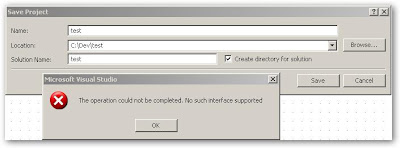 WHAT!? “The operation could not be completed. No such interface supported.” Now there’s a useful error. Ummm… So now file system operations are not supported… Uh… right.
So, it took longer than it should have but I finally found this thread:
http://softwarecommunity.intel.com/isn/Community/en-US/forums/thread/30236807.aspx
Which leads me to hypothesize that in all the uninstalling and re-installing perhaps this ridiculous setting in Visual Studio got mysteriously unchecked and that caused VS to stop saving projects? Right.
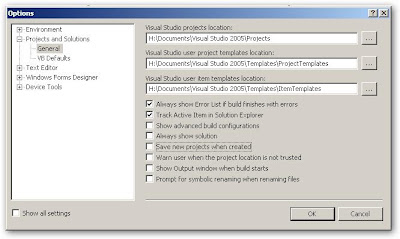
How much sense does a setting like this make anyway (yes, I get the point, but who in their right mind would ever want to create temporary projects); and more importantly – why does that setting seem to make it impossible to save your “temporary” project later?
After checking the box beside “Save new projects when created” and restarting VS all was well again in Not-Losing-My-Work-Land. Hmmm…
Comments Off on Diabolical Microsoft Visual Studio Quirk | tags: .net, bugs, ide, visual studio | posted in Development, Technology